blog-header

Wednesday, 4 March 2015

Year 1 Project - Response to Music

We've just finished a two-week project where we asked the students to choose one piece of music from three alternatives, each one very different in terms of style, mood or lyric content.

They were asked to produce a piece of design/illustration based music packaging (CD, LP, 7" Single etc.) or a piece of film/animation.

In all cases the work they produced had to be an 'emotional equivalent' to the music it supported. This was a tough assignment as the students had to empathise fully with the music and then work out exactly what they wanted to communicate to the viewer.

We spent last Friday looking at some very interesting work presented across a wide range of media. Here are some highlights from the day:


Kyle Bridson (Year 1 Illustration) with a 12" gatefold sleeve (in transparent outer slipcase) for Goldfrapp's A&E


Emma Davidson (Year 1 Illustration) with a short animation to accompany Neko Case's Man


Chloe Farsi (Year 1 Graphic Design) with a gatefold sleeve for Deathly by Aimee Mann


Caitlin Quinn (Year 1 Illustration) with a film and animation response to Samuel Barber's Knoxville Summer of 1915
Here's the same track (Knoxville Summer of 1915) interpreted by Leanne Smith (Year 1 Illustration) as a CD sleeve


Sarah Nevison (Year 1 Graphic Design) made a film to accompany Meyer by The Neil Crowley Trio


Tuesday, 3 March 2015

indesign for issuu

Issuu is an online facility that allows you to upload and browse pdfs in the form of book / magazine. Creating a pdf ‘book’ to upload to issuu, couldn’t be easier. We’ll use InDesign to create a multi-page pdf. Don’t worry if you’ve never used indesign or even heard of it. We’ll use it in the most rudimentary way possible – you’ll receive much more informative and in-depth inductions and schooling later, from people who’s Geekus Callosum (the part of the brain that deals with Macs, software and the like) are hugely engorged and stuffed full of info.
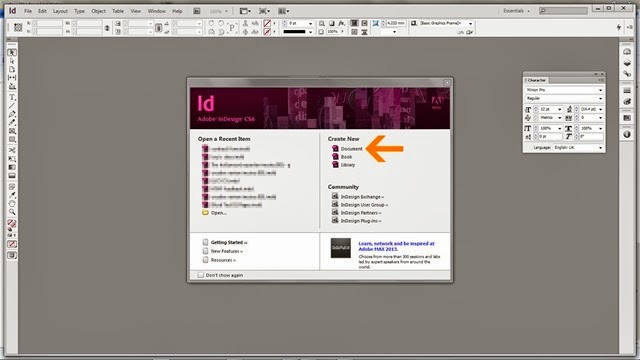
101Open InDesign. From the start up options select ‘Document’. If you accidentally close this window before selecting, stop crying and go to File>New>Document
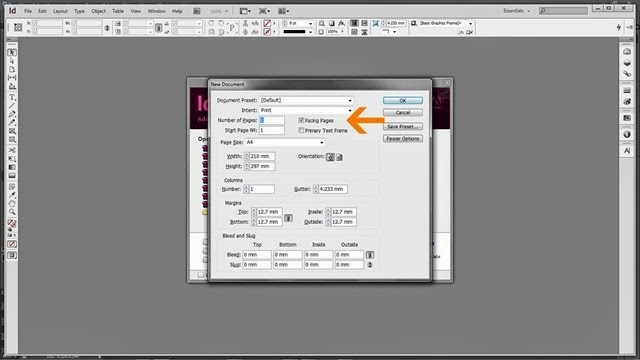
202From the options, select Facing pages. This will allow you to view your design in a book format.
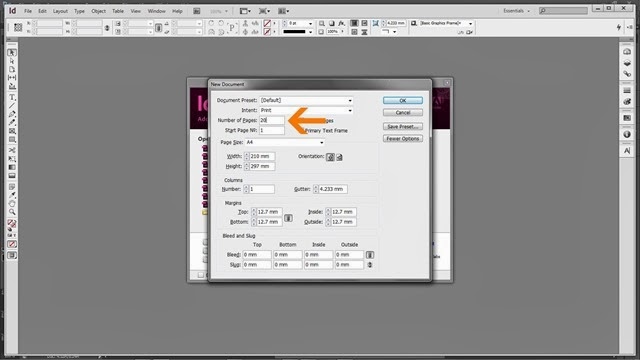
305Enter the number of pages you want (remember, the first and last will be covers). You can easily amend this later. In fact, I’m not sure why they bother asking you now.
406This is the part where you pick the size and orientation of your document. The size you enter is for a single page so a spread will be twice the width.
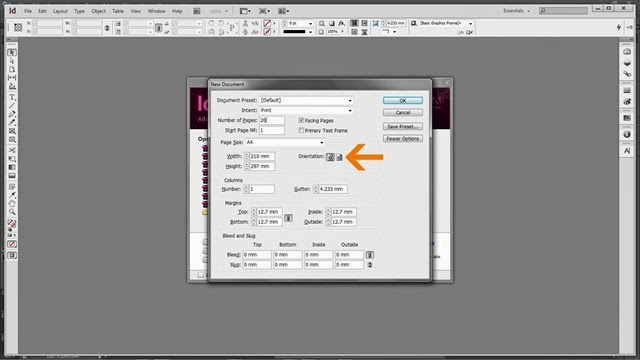
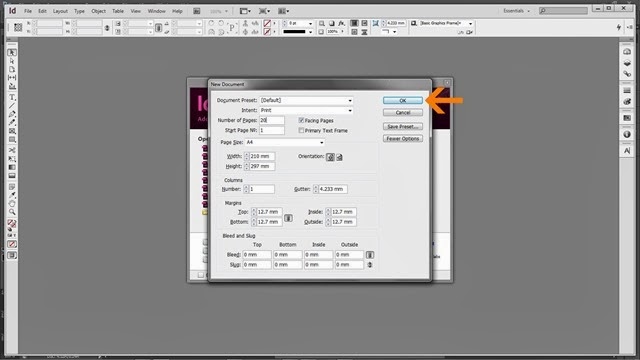
507With facing pages selected, page number selected, the correct sizes entered, the correct orientation entered hit OK.
608Now you’re looking at a blank document. A cover, several blank spreads and a back cover.
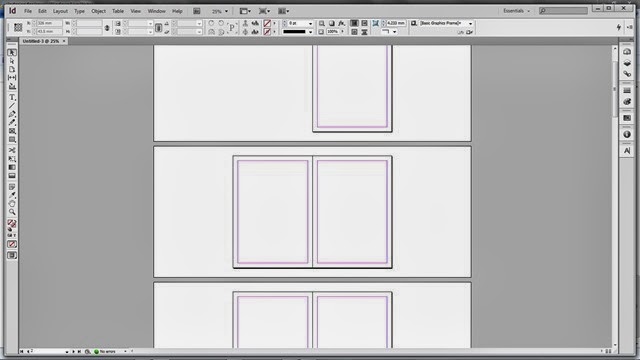
InDesign has a approximately a millionbillion options, buttons, and things. You don’t need to worry about nearly all of them.
709
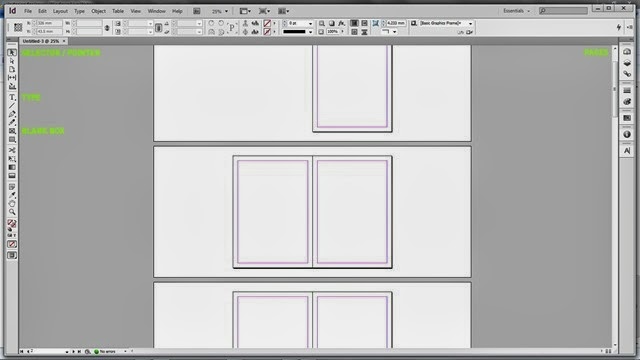
Selector / Pointer (black arrow at top of tool bar). It probably has a proper name. Use this for selecting items (picture boxes, type boxes etc). It’s your general ‘go to guy’.
Type (T). Select this when you want to create type in InDesign. When selected, drag cursor to create a box in which to put type.
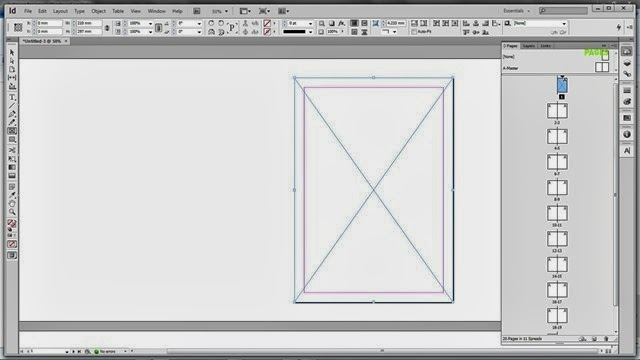
Blank Box (rectangle with cross through it). When selected, drag cursor to create a box in which to put items like images – saved else where.
Pages. Select this (also available Windows>Pages) to view info on the pages / layout. The selected page displays in blue. Note. The page you’re looking at on the main workspace isn’t always the page that’s selected.
Like most Adobe programmes, the bar along the top of the workspace is dependent on the tool you have selected. Options for each tool will display here. For example when Type tool is selected, font, weight and other options will show here.
8 – adding an image11
Select the blank box tool (again it probably has a proper name).
Drag a box in which you want to place an image. In this instance I’m putting a full page image on the cover.
912
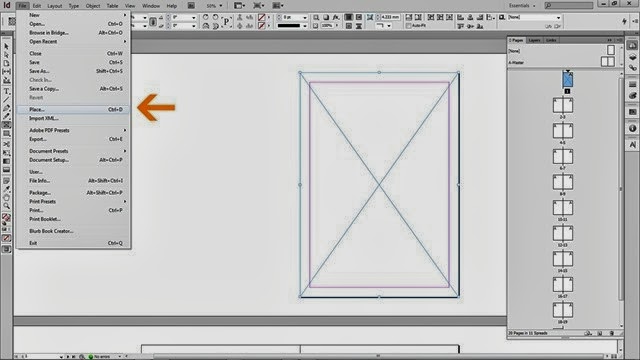
File>Place (or command D) will open a dialogue box, locate and select the image you want to place (must be on the machine you are using or on an inserted hard drive). Once placed, right click (CTRL click on single button Mac)
1013When you right you will get this menu, look for and pass over ‘Fitting’. The options here tell the box how you want the content to fit. The options are fairly self explanatory but in this case I want it to ‘Fit Content Proportionally’.
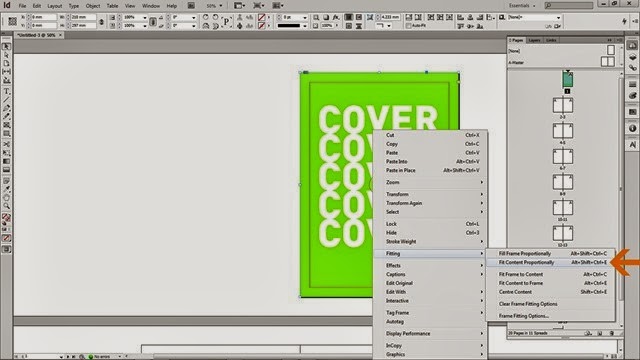
1119 In this way you can fill your book with content. You can design this content in photoshop. You can create it by hand and scan it in. You can use photographs directly. Essentially, the above image should represent what you have when you’re finished. Now we have to export the document as a pdf for issuu
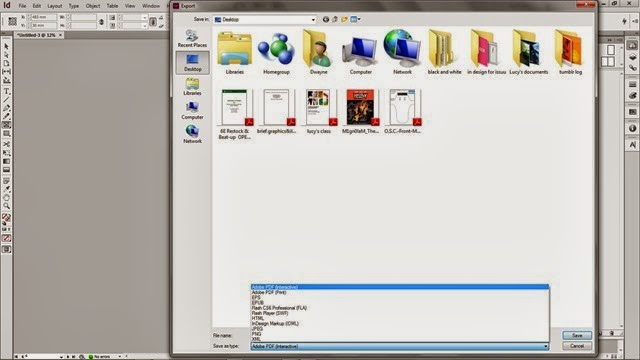
1220. To export got to File>Export. There are two kinds of pdf. They’re slightly different but both work fine. If you want to add hyperlinks in your document (type that links to websites, email accounts) you want interactive. If not, print. You will also have to give a location for your pdf to be saved to. Click Save.
1321Then you get this. A variety of options that dictate how your pdf is created. The most important one is pages. You must select pages. If you select Spreads then it will all go pear shaped in issuu.
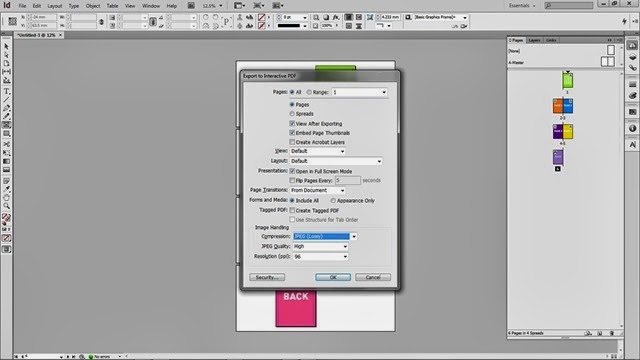
Once you hit OK your pdf will be generated and saved to the location you specified, ready to be uploaded to issuu. Which is a whole other story!

Friday, 20 February 2015

Grillust infiltrates BAFTA red carpet

You can't move these days without bumping into an comic book hero. Here at Grillust Towers we've got our very own hero in the shape of Beth. Beth's powers, which include a strong Brummie accent, originate from a wooly hat of questionable stylings, which she must wear at all times to conceal her true identity / keep the shaved portions of her head warm.
But what happens when heroes meet? (Apart from everyone going bananas and handing Marvel a licence to print money).
Here's what happens when Beth met...

The Man of Steel


Keeps his pants inside his trousers.


Captain America


Invades personal space.


Loki


Pinches her camera (but returned it later because he knows what's what).


(This one's stretching it a bit) Jonah Jameson (from Spiderman)


Smugly ignores her from a distance.


Charles Xavier


Turns his back when his mind reading powers are blocked by Beth's wooly hat of power.

Tune in next week, same Beth time, same Beth channel...

and here she is on the BBC news (who have stupidly captioned the piece with Rosamund Pike's, name as she also appears).


Wednesday, 18 February 2015

You might remember the our very own 3rd Year Graphic Design student, Josh J. Ford (21), was commended in the 13-14 YCN Student Awards.

For the awards ceremony we can only hope that fashion icon Josh complimented the mandatory tuxedo with his 'trademark' footwear – rhinestone cowboy boots (or wellington boots in inclement weather); either worn outside the trouser.

Well, all that was last summer but, apart from a slap-up feed and free alcohol, Josh has also been featured in the recent YCN Student Annual.


Josh (now 33) has been employed as  graphic designer with Honda since graduating. Hopefully he still wears the boots.

Visiting Illustration Lecturer - The Wonderful Jill Calder

One of the nations' finest professional illustrators Jill Calder, paid a welcome return visit to The University of Cumbria recently.


Jill commenced her art studies with us here in Carlisle many years ago (see above) when we were simply called Cumbria College of Art & Design. Since then she's gone on to forge a successful international career as a freelance illustrator.

Apart from giving a guest talk to our students in a packed lecture theatre, Jill also found the time to hold one-to-one tutorials with our Year 3 Illustration students.


Jill is represented by Central Illustration Agency in the UK and by Friend and Johnson in the USA.


Jill gave lots of advice on the pros and cons of having an illustrator's agent.


One of the biggest projects Jill has ever worked on, her illustrated 'Robert the Bruce' was published to great acclaim last year. Jill spent a year working on the illustrations for this book, producing over 174 large sheets of ink drawings and lettering and 5 sketchbooks of notes, drawings and ideas, bringing the final illustrations together digitally.


One of the 'Bruce' sketchbooks...

Jill talked about the process of developing her final illustrations...

De Bohun attacks Robert - first version

De Bohun attacks Robert - second version


De Bohun attacks Robert - as used in the book


Jill has recently been creating a lot of experimental artists' books.

After her lecture students spent time looking at Jill's sketchbook and development sketches


Here are a few of the slides that Jill showed during her talk...

 'Lion Food' (digital print)


 Sound advice...


 Spot any famous faces?


 Murals for The Royal Brompton Hospital, London


 'Forest Deer' a bronze award winner from AOI Images 35

Friday, 13 February 2015

Now Showing...


That's right folks, 1971's Carry on Henry (the 21st film in the ever popular series of highbrow rib ticklers) has finally made it to Carlisle cinemas. One to share with that special someone this Valentine's weekend?

Tuesday, 10 February 2015

What did people do in the Dark Ages?

Well last Tuesday we found out...

Careless road workers drilled through a major electrical cable plunging a third of Carlisle (the third that has our campus in) into total darkness*

Let's see how the students (and staff) coped without their beloved electrical technology for what seemed like an eternity**


 Dazed and confused, the enormity of the situation has yet to sink in...

 Year 3 students express their displeasure by adopting the typical 'local' newspaper 'we're not happy campers' pose.

 As bodies cooled down, almost forgotten playground games were employed to increase circulation.

Smug illustrators Jake and Maddy (21 & 21) gloating at the emergency safety light illuminating their illustrating.

 "Hello ladies..." Who needs electricity? Certainly not James (21) with his vast array of marker pens...


 ...or Ed (also 21) with his equally impressive collection


In a future devoid of power the smart money was on pens and pencils. Please note the well ordered queue to our shop. Even in such terrible circumstances, order and politeness ruled the day.

* The power was cut at 11.45AM

** Power was restored 1 hour 45 minutes later

Wicker Hut Watch No.3

February 2015

Q: Is it still there?

A: Yes it is!